/
Emoji maker Telegram mini app
Turn your own handwriting into custom emoji you can use anywhere in Telegram. A Telegram mini app I took from idea to shipped frontend, then reshaped around real user feedback into a two-surface product with 124 active users.
Try out yourself
Personal project — Telegram Mini App

Context
Problem
Process
1
Idea & framing
Defined the smallest useful loop — draw a letter, save it, publish a full alphabet as one Telegram custom emoji pack — and scoped v1 around just that. Multiple packs and non-Cyrillic sets were parked until the core loop proved itself.
2
Design
Designed the flows and screens in Figma — drawing board, per-letter progress chips, preview and success/share modals. Iterated design tokens straight against Figma's dev-mode data, and locked the UI to a fixed light theme to keep visual QA predictable while dark mode waits for its own pass.
3
Build
Built the frontend myself with AI-assisted coding, as a single HTML/CSS/JS file with no build step — matching the project's "keep it in one file" constraint — checking the design against the real running prototype, not just the Figma file.
4
Ship & iterate
Shipped it inside Telegram and ran a feedback round with ~12 users alongside my backend partner, collecting bugs and wishes on a board. That round reshaped the product — see below.
Solution
The bot is the entry point and control room; the mini app is the drawing surface. In the chat you pick a preset and manage packs with inline buttons; the mini app opens to draw the letters of that preset, then hands you back to the bot to publish. One tap on «Get pack» (or «Update pack») pushes everything into a Telegram custom emoji set you can share as a link.
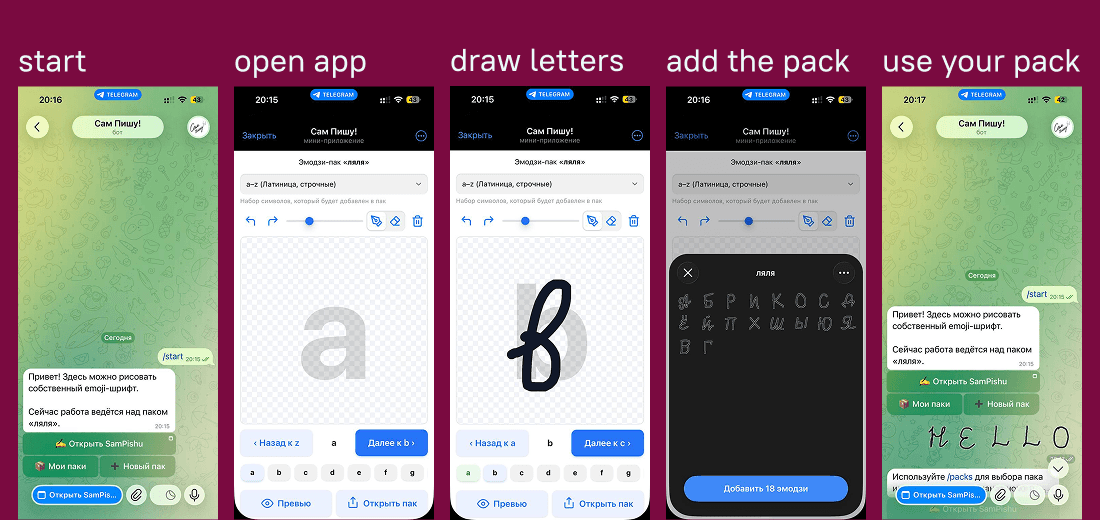
Presets instead of manual symbol selection — simpler, and within Telegram's per-pack limit
Full drawing toolkit: brush size, eraser, undo/redo, clear
Live per-letter status (to draw / active / saved)
One-tap publish with a shareable link
Multiple packs per user, safely switchable from the bot chat
What testing changed
The feedback round changed what the product is. Three decisions came out of it:
Cut the scope nobody used
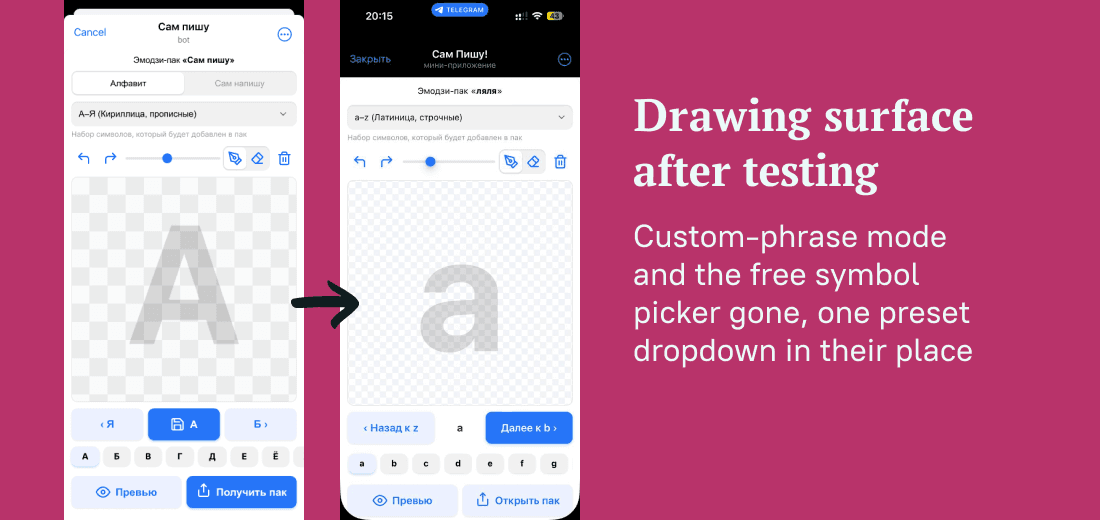
Nobody touched the "write your own phrase" mode, and the symbol-set controls only added weight. I removed both and replaced free symbol selection with two presets the user picks up front — Cyrillic + digits & symbols or Latin + digits & symbols. That also works around Telegram's per-pack symbol limit, and keeps v1 simple enough to ship now. The sharpest call was subtractive: less, sooner.
Split the product across two surfaces
I moved all pack management — creating, switching, publishing — out of the mini app and into the bot chat as inline buttons, leaving the mini app to do one thing well: drawing. Each surface does what it's best at, instead of one screen carrying everything.
Telegram can take up to an hour to propagate an emoji change to clients, so a success screen implying "done, instantly" would have been misleading. I split that state into "Telegram accepted the change" vs "your client may not show it yet," and added a guard that blocks saving into a pack you've since switched away from in chat.
Result
Shipped end-to-end — from a personal itch to a live Mini App on a real Telegram bot and backend, in daily use by me and friends on @sam_pishu_bot. Not a demo.
The ~12-user feedback round did more than surface bugs: it cut scope and split the product across two surfaces, and the sharpest calls were all subtractive. The bigger lesson was how much platform constraints — async propagation, per-pack limits, sticker-set API quirks — should shape UI states, copy, and even which surface owns what, not just visuals.
What this case shows
End-to-end ownership
I carry a product from a personal itch through Figma design to a shipped, live frontend, solo.
Research-driven decisions
I ran a real feedback round and let it change the product, not just my pixels: cutting unused modes, swapping controls for presets, moving management to the bot.
Multi-surface product thinking
I split the experience across two Telegram surfaces by what each does best, instead of cramming everything into one screen.
Modern toolchain
Figma dev-mode tokens, MCP handoff, AI-assisted build, no-build single file. I ship, not just mock up.
contacts
I'm open to UX / product design roles